TVision
view release on metacpan or search on metacpan
tvision.git/README.md view on Meta::CPAN
.charCode = 164 ('ñ'), // In CP437
.scanCode = 0
}
},
.controlKeyState = 0x200 (kbInsState),
.text = {'\xC3', '\xB1'}, // In UTF-8
.textLength = 2
}
```
However, if they type `€` the following will happen:
```c++
KeyDownEvent {
union {
.keyCode = 0x0 (kbNoKey), // '€' not part of CP437
.charScan = CharScanType {
.charCode = 0,
.scanCode = 0
}
},
.controlKeyState = 0x200 (kbInsState),
.text = {'\xE2', '\x82', '\xAC'}, // In UTF-8
.textLength = 3
}
```
If a key shortcut is pressed instead, `text` is empty:
```c++
KeyDownEvent {
union {
.keyCode = 0xB (kbCtrlK),
.charScan = CharScanType {
.charCode = 11 ('♂'),
.scanCode = 0
}
},
.controlKeyState = 0x20C (kbCtrlShift | kbInsState),
.text = {},
.textLength = 0
}
```
So, in short: views designed without Unicode input in mind will continue to work exactly as they did before, and views which want to be Unicode-aware will have no issues in being so.
## Displaying Unicode text
The original design of Turbo Vision uses 16 bits to represent a *screen cell*—8 bit for a character and 8 bit for [BIOS color attributes](https://en.wikipedia.org/wiki/BIOS_color_attributes).
A new `TScreenCell` type is defined in `<tvision/scrncell.h>` which is capable of holding a limited number of UTF-8 codepoints in addition to extended attributes (bold, underline, italic...). However, you should not write text into a `TScreenCell` di...
### Text display rules
A character provided as argument to any of the Turbo Vision API functions that deal with displaying text is interpreted as follows:
* Non-printable characters in the range `0x00` to `0xFF` are interpreted as characters in the active codepage. For instance, `0x7F` is displayed as `⌂` and `0xF0` as `≡` if using CP437. As an exception, `0x00` is always displayed as a regular spa...
* Character sequences which are not valid UTF-8 are interpreted as sequences of characters in the current codepage, as in the case above.
* Valid UTF-8 sequences with a display width other than one are taken care of in a special way, see below.
For example, the string `"â•”[\xFE]â•—"` may be displayed as `â•”[â– ]â•—`. This means that box-drawing characters can be mixed with UTF-8 in general, which is useful for backward compatibility. If you rely on this behaviour, though, you may get unex...
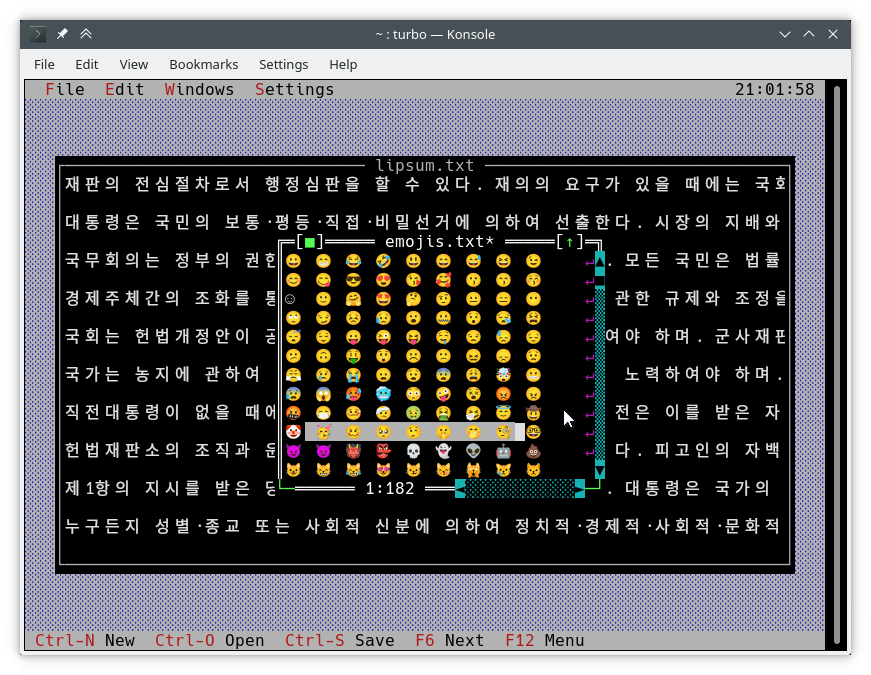
One of the issues of Unicode support is the existence of [double-width](https://convertcase.net/vaporwave-wide-text-generator/) characters and [combining](https://en.wikipedia.org/wiki/Combining_Diacritical_Marks) characters. This conflicts with Turb...
* Double-width characters can be drawn anywhere on the screen and nothing bad happens if they overlap partially with other characters.
* Zero-width characters overlay the previous character. For example, the sequence `में` consists of the single-width character `म` and the combining characters `े` and `ं`. In this case, three Unicode codepoints are fit into the same cell...
The `ZERO WIDTH JOINER` (`U+200D`) is always omitted, as it complicates things too much. For example, it can turn a string like `"👩👦"` (4 columns wide) into `"👩â€ðŸ‘¦"` (2 columns wide). Not all terminal emulators respect the ZWJ, so, i...
* No notable graphical glitches will occur as long as your terminal emulator respects character widths as measured by `wcwidth`.
Here is an example of such characters in the [Turbo](https://github.com/magiblot/turbo) text editor:
### Unicode-aware API functions
The usual way of writing to the screen is by using `TDrawBuffer`. A few methods have been added and others have changed their meaning:
```c++
void TDrawBuffer::moveChar(ushort indent, char c, TColorAttr attr, ushort count);
void TDrawBuffer::putChar(ushort indent, char c);
```
`c` is always interpreted as a character in the active codepage.
```c++
ushort TDrawBuffer::moveStr(ushort indent, TStringView str, TColorAttr attr);
ushort TDrawBuffer::moveCStr(ushort indent, TStringView str, TAttrPair attrs);
```
`str` is interpreted according to the rules exposed previously.
```c++
ushort TDrawBuffer::moveStr(ushort indent, TStringView str, TColorAttr attr, ushort maxWidth, ushort strOffset = 0); // New
ushort TDrawBuffer::moveCStr(ushort indent, TStringView str, TColorAttr attr, ushort maxWidth, ushort strOffset = 0); // New
```
`str` is interpreted according to the rules exposed previously, but:
* `maxWidth` specifies the maximum amount of text that should be copied from `str`, measured in text width (not in bytes).
* `strOffset` specifies the initial position in `str` where to copy from, measured in text width (not in bytes). This is useful for horizontal scrolling. If `strOffset` points to the middle of a double-width character, a space will be copied instead ...
The return values are the number of cells in the buffer that were actually filled with text (which is the same as the width of the copied text).
```c++
void TDrawBuffer::moveBuf(ushort indent, const void *source, TColorAttr attr, ushort count);
```
The name of this function is misleading. Even in its original implementation, `source` is treated as a string. So it is equivalent to `moveStr(indent, TStringView((const char*) source, count), attr)`.
There are other useful Unicode-aware functions:
```c++
int cstrlen(TStringView s);
```
Returns the displayed length of `s` according to the aforementioned rules, discarding `~` characters.
```c++
int strwidth(TStringView s); // New
```
Returns the displayed length of `s`.
On Borland C++, these methods assume a single-byte encoding and all characters being one column wide. This makes it possible to write encoding-agnostic `draw()` and `handleEvent()` methods that work on both platforms without a single `#ifdef`.
The functions above are implemented using the functions from the `TText` namespace, another API extension. You will have to use them directly if you want to fill `TScreenCell` objects with text manually. To give an example, below are some of the `TTe...
```c++
size_t TText::next(TStringView text);
size_t TText::prev(TStringView text, size_t index);
void TText::drawChar(TSpan<TScreenCell> cells, char c);
size_t TText::drawStr(TSpan<TScreenCell> cells, size_t indent, TStringView text, int textIndent);
bool TText::drawOne(TSpan<TScreenCell> cells, size_t &i, TStringView text, size_t &j);
( run in 2.168 seconds using v1.01-cache-2.11-cpan-5c0b1e786e0 )