App-Tel
view release on metacpan or search on metacpan
sudo apt-get install libmodule-install-perl libtest-most-perl libhash-merge-simple-perl libexpect-perl libio-stty-perl make
Now you can run the usual build commands to install:
1. perl Makefile.PL
2. make
3. make install
A far easier way to install is to use cpanminus if you're
comfortable with it, now that the app is on CPAN:
1. curl -L https://cpanmin.us | perl - App::cpanminus
2. cpanm App::Tel
When you've installed and are ready to use the app, you can instruct your users
to run "mktelrc". This will prompt them for the username and password they use
for routers, then write them to a .telrc2 file in their home directory.
This file should be only readable by the user for security reasons, although
the very act of storing passwords for your routers in a file means you are
already defeating some security. I advise you to only run this on a heavily
firewalled box that is only used to allow users to access routers.
Obviously, if the router supports real ssh keys or any other secure
authentication you should let the login be handled by that. This script can
still provide value without the need to login for you.
# Optional Dependencies
You may want to download File::KeePass, Passwd::Keyring::Auto,
Passwd::Keyring::Gnome, Crypt::PWSafe3, or GnuPG::Interface. If any of these are
installed they will be used to provide additional features. Some setup may be
required. Please see the [COMMANDS] file for more information.
# History
If you've worked at a NOC at any point in time you’ve probably made a script
like this one. It's probably written in Expect and probably sends your username and
password to log you in. You might have different variants for different types
of devices, or different things you need to do to a device.
This script aims to replace all of those and provide an easy to use
interactive client for most of the CLI I've encountered.
I've been working on this off-and-on for 14 years. It started out in expect
and now is written in perl/Expect.pm.
# Similar Programs (at least with regards to colorized Cisco CLI)
After posting this to reddit I found some people had similar ideas and had
made progress on some things, but some have taken different directions. Here
are the projects I know about:
1. A comment in http://www.reddit.com/r/networking/comments/2bxehw/coloring_cli/ references a
python expect implementation. Here is a screenshot with some example code
http://i.imgur.com/1slyPkK.png
2. This thread gives a few ideas that I'll list below http://www.reddit.com/r/networking/comments/2hy2dj/cisco_cli_colorization/
3. Cisco nx-os supports CLI coloring directly with "terminal color"
4. Cisco embedded event manager can be used to colorize output in recent IOS
versions. You need to write scripts on each of the devices you connect
with.
5. SecureCRT or MacOS iTerm2 can highlight sections by regex, if you prefer
doing it at the terminal emulator level
6. If you want to do it at the ssh protocol level, there is
https://github.com/mxtommy/Cisco-SSH-Client
# Bugs or Caveats
1. Sending a "#" to the router via -c will match that as a prompt if that is what
your prompt is set for. clear_accum doesn't fix this.. need to put more
thought into it.
2. See [ISSUES] for a complete list of currently existing bugs
# Information
Please let me know about bugs or feature requests via github. Submit patches
when possible to fix or enhance something, or to improve the testing.
## Screenshots
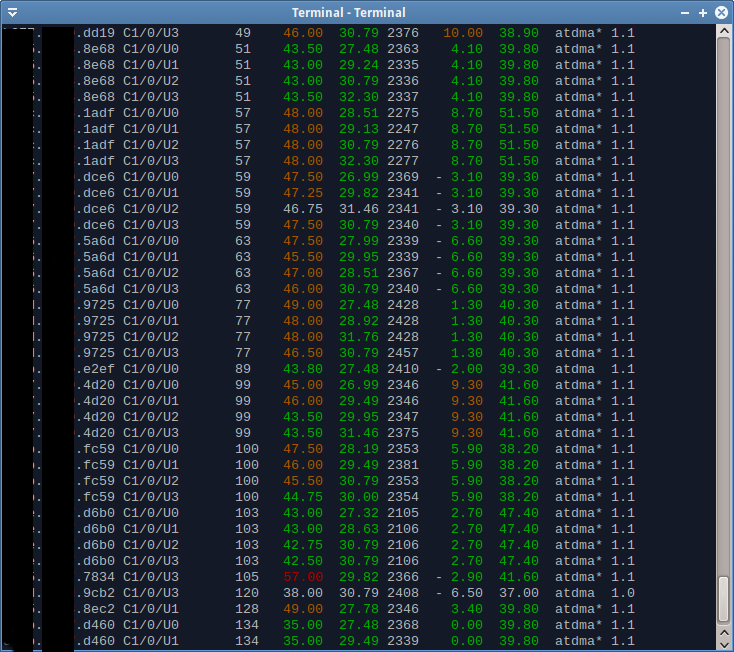
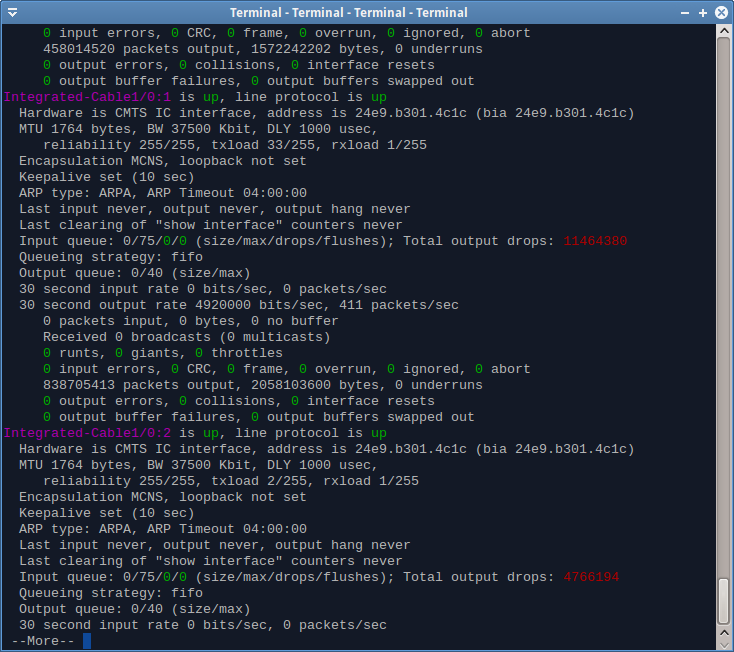
## Namespace change from Expect::Tel to App::Tel
I decided to put it on CPAN with the "tel" name despite it being pretty
generic. If you've been running the script a while you may have left over
library files in <perl_location>/Expect/Tel/. These are now unused and safe
to remove. You might run "make uninstall" on the old release before
installing the new version.
##### Copyright 2015, Robert Drake
[COMMANDS]: COMMANDS.md
[ISSUES]: https://github.com/rfdrake/tel/issues
( run in 0.778 second using v1.01-cache-2.11-cpan-39bf76dae61 )